 Kite
KiteClaude writes the plan. Kite lets you read it.
Your AI generates plans, specs, and docs as .md files. Spacebar in Finder should show them formatted. Now it does.
AI keeps giving you Markdown files. macOS acts like it’s never seen one.
Claude Code just wrote you a 200-line implementation plan. You switch to Finder, select the file, hit spacebar. And Quick Look shows you a wall of hashtags, asterisks, and backticks. The content is there. You just can’t read it.
Kite makes spacebar show the formatted document instead.
Open a file. Read it. Edit it. Done.
Five things Kite does well, and nothing it doesn't need to.
Spacebar in Finder renders any .md file
Install Kite once and every Markdown file on your Mac gets a formatted preview in Quick Look. Select a file, press space, read it. Nothing else to open.
Edit the spec inline, paste it back into your next prompt
Headings, bold, code blocks, tables: everything renders as you type. The raw syntax only appears when your cursor is near it. You're always reading a formatted document, not marking one up.
Opens before you finish double-clicking
Native macOS, not a web app in disguise. Kite launches instantly and stays light in the background. Your Mac won't notice it's there.
Your .md files stay .md files
Kite edits Markdown directly, nothing proprietary. It works alongside your terminal workflow without asking for anything. Quit Kite and the files are exactly where you left them.
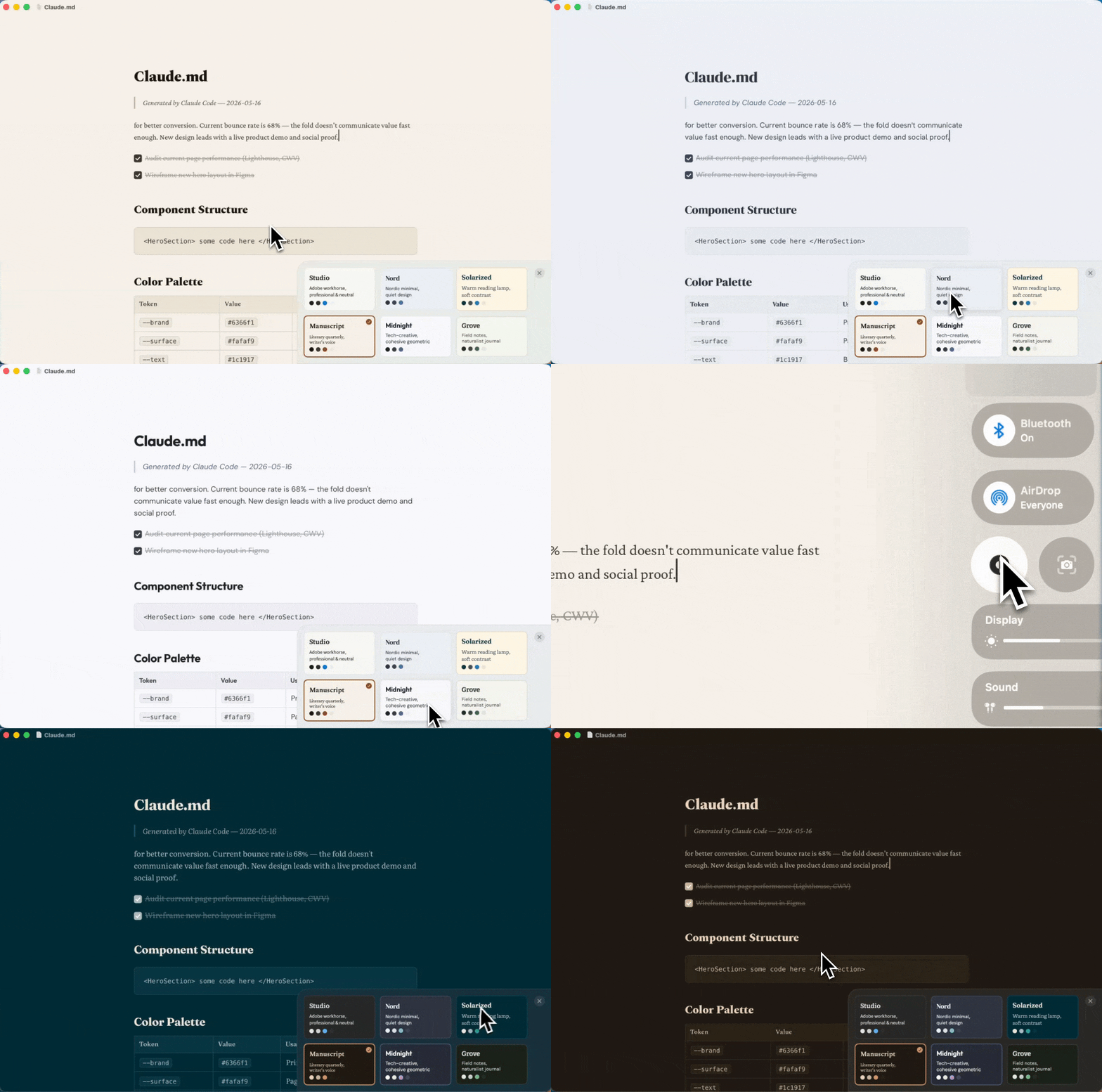
Six themes, tuned for reading
Each one is font-paired and color-tuned for long sessions. Not a color swap. Hit ⌘⇧T to switch, hover to preview.
How it works.
Three features that separate Kite from every other markdown tool on Mac.
The syntax hides. The formatting stays.
Headings, bold, code blocks, tables: everything renders inline as you type. No split pane. No raw syntax cluttering your view. You're always looking at a clean, formatted document.
- Inline formatting renders as you type
- No split-pane or preview mode needed
- Clean reading view, always

Press space. Read the file.
Install Kite once and every .md file on your Mac gets a formatted preview in Quick Look. Select a file in Finder, press spacebar, and read it instantly. No app to open.
- Works system-wide in Finder
- No app launch required
- Renders headings, lists, code blocks

Pick one. The whole document changes.
Six themes, each with its own fonts, colors, and personality. Hover to preview, click to switch. Light and dark modes are built in.
- Light and dark modes
- Font-paired, not just recolored
- Live preview on hover
Built for people who build from the terminal.
Your editor is a terminal. Your project manager is an AI. Half your files are .mddocuments you didn’t write by hand. You live in this workflow because it’s fast, but the moment you need to actually read one of those files, macOS has nothing for you.
Kite is the missing piece: spacebar in Finder now renders Markdown.
What about the other options?
Quick Look (built-in)
Shows raw Markdown syntax. **Bold** stays **bold**. Kite replaces this with a Quick Look extension that renders .md files formatted. Install once, works everywhere.
cat / bat in terminal
Fine for a quick glance at a short file. A 200-line implementation plan with nested headings, checklists, and code blocks? You want formatting.
VS Code / Cursor
You moved to a terminal workflow to avoid IDE overhead. Opening one just to read a spec defeats the point.
Obsidian
Built for a knowledge base you tend over months. Importing every AI-generated spec into a vault is overhead for files you might read once and move on.
Looking for a detailed comparison? See how Kite compares to Typora, Obsidian, and MacDown.